Seeed Studio XIAO ESP32-C6
A thumb-sized Wi-Fi 6, Bluetooth 5, and Matter (Zigbee/Thread) microcontroller designed to upgrade your Smart Home without sacrificing the looks of your home. A modern step up from the C3 and C5, this compact chip fits anywhere and can turn almost any ordinary appliance into a smart one.
Technical Specifications
| Processor | High-performance 32-bit RISC-V processor clocked up to 160 MHz, paired with a low-power 32-bit RISC-V coprocessor (20 MHz). |
| Wireless | 2.4 GHz Wi-Fi 6 (802.11ax), Bluetooth 5.0 (LE), Zigbee 3.0, and Thread (802.15.4). Fully ready for Smart Home and Matter ecosystems. |
| Memory | 512 KB onboard SRAM and equipped with 4 MB built-in Flash memory for scripts and storage. |
| Interfaces | 11x digital GPIO pins (all PWM capable), 6x analog ADC pins. Supports I2C, UART, SPI, and I2S serial communication. |
| Power & Charging | Powered via USB Type-C (5V). Features a built-in battery charging circuit with dedicated solder pads on the underside for LiPo batteries. |
| Dimensions | Extremely compact 'XIAO' form factor measuring just 21 mm x 17.5 mm. Perfect for wearables and small enclosures. |
Supported Programming Languages
| RISC-V Assembly | Bare-metal & Low-level: Write native assembly code (.S) or inline assembly within C for maximum hardware control. Use any text editor paired with the GCC RISC-V toolchain / esptool.py (All OS). |
| C / C++ | Industry Standard: Full support for Espressif's official ESP-IDF framework or the beginner-friendly Arduino IDE. Available natively on Windows, Linux, and macOS. |
| Rust | Safe Bare-metal: Excellent native RISC-V support. Program using VS Code combined with Cargo and the espflash utility (All OS). |
| Python (recommended) | MicroPython & CircuitPython: Perfect for fast prototyping and scripting. Best managed using Thonny IDE on Windows, Linux, and macOS, or via VS Code with the Pymakr extension. |
| JavaScript | Web-Tech IoT: Deploy lightweight JavaScript applications using frameworks like Moddable or Espruino via VS Code and Node.js (All OS). |
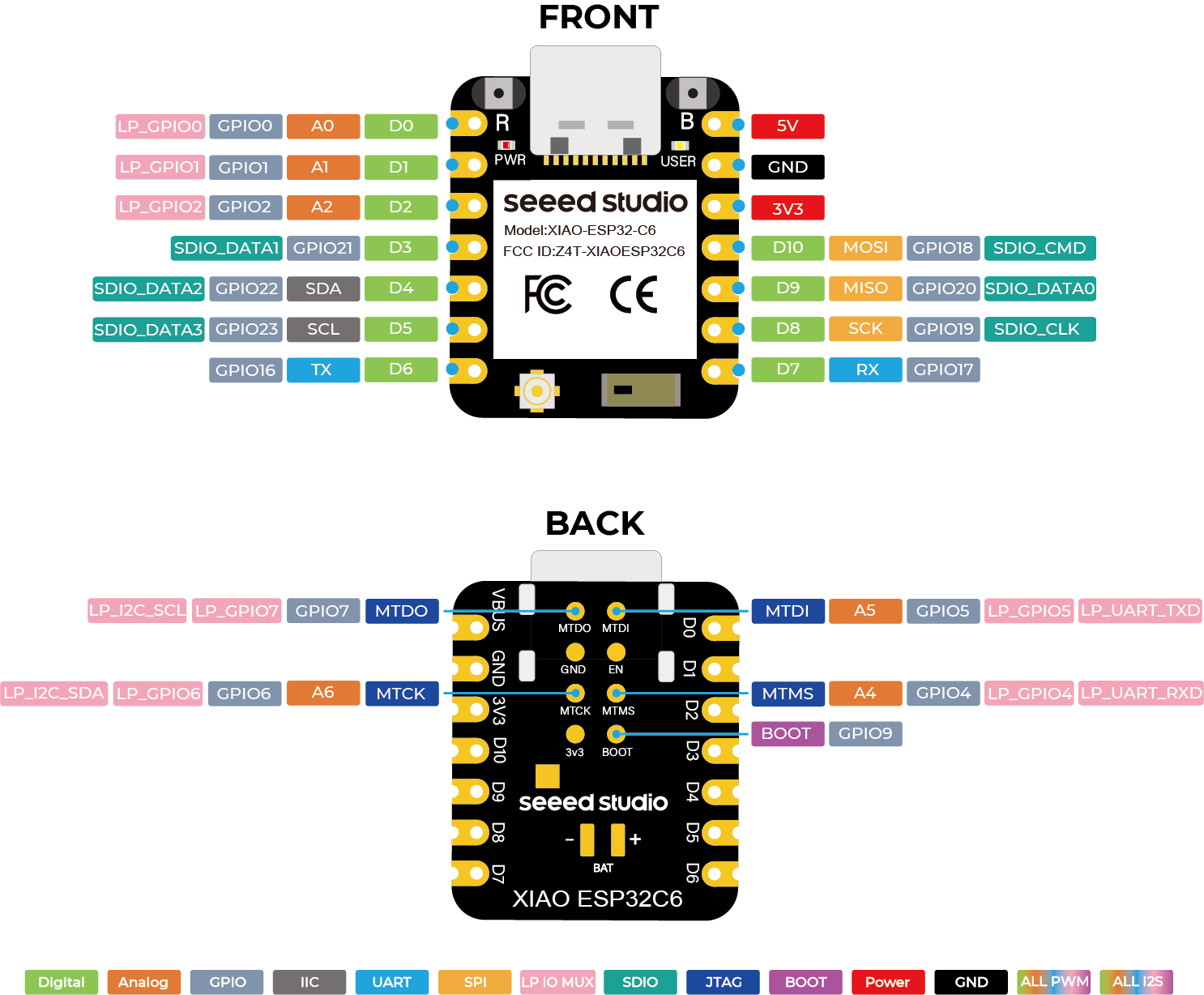
Hardware Pinout Diagram
Required Tools & Connection
Before flashing the code, make sure you have the right environment set up on your computer:
| IDE (Software) | We highly recommend Thonny IDE. It is beginner-friendly and works out of the box on all platforms. |
| Linux Installation | Install via your package manager (e.g., sudo apt install thonny) or the official installer script. Ensure your user belongs to the dialout group for USB permissions. |
| Windows & macOS | Simply download and run the official installer from thonny.org. Drivers are usually handled automatically. |
| Hardware Connection | Connect your XIAO ESP32-C6 to your computer using a USB Type-C data cable (ensure it's not a charge-only cable). In Thonny, go to Tools > Options > Interpreter, select MicroPython (ESP32), and choose your board's COM/USB port. |
Quick Start: Test Your MicroPython Access Point
Run the following MicroPython script to immediately deploy your own local Wi-Fi Access Point. Once activated, you can search for the network on your phone or laptop and connect using the defined security credentials.
import network

ap = network.WLAN(network.AP_IF)
ap.active(True)
ap.config(ssid="ESP32-C6 XIAO", password="ceylonstudios", security=3)